Dynamics 365 Implementation Timeline: From Evaluation to Go-Live
Dynamics 365 Implementation Timeline: From Evaluation to Go-Live
A typical Microsoft Dynamics 365 implementation can take anywhere from 6 weeks to 12 months or more, depending on the solution, business complexity, integrations, data migration, customizations, and organizational readiness.
For example, a Dynamics 365 Sales/CRM implementation may take approximately 6–12 weeks, while a Dynamics 365 Business Central implementation can range from 8–32+ weeks depending on the functionality required. Complex, multi-company enterprise deployments may take 6–12 months.
At OmniVue, one of the most common questions prospective clients ask is:
“How long will it take to evaluate, purchase, and implement Microsoft Dynamics 365 Business Central or Dynamics 365 CRM?”
While every organization is different, successful Dynamics 365 projects generally follow a predictable evaluation and implementation process. Understanding the Dynamics 365 implementation timeline can help organizations establish realistic expectations, allocate internal resources, reduce implementation risk, and achieve faster time-to-value.
OmniVue follows a structured implementation methodology that guides organizations from initial discovery and requirements gathering through design, development, deployment, user adoption, and ongoing support.
The methodology includes six core stages: Diagnostics, Analysis, Design, Development, Deployment, and Operation.
Below is what organizations can typically expect from the first conversation through go-live and beyond.
Dynamics 365 Discovery and Qualification
Typical Timeline: 1–3 Weeks
The Dynamics 365 implementation process begins with discovery.
During this phase, OmniVue works with key stakeholders to understand the organization’s current environment, business objectives, operational challenges, and reasons for evaluating a new ERP or CRM solution.
What We Explore During Discovery
Dynamics 365 CRM & Sales
For organizations evaluating Dynamics 365 CRM or Dynamics 365 Sales, discussions often focus on lead and opportunity management, sales pipeline visibility, marketing processes, customer service, reporting, and automation.
Dynamics 365 Business Central
For organizations evaluating Dynamics 365 Business Central, discovery typically focuses on financial management, inventory, purchasing, sales order management, warehousing, manufacturing, reporting, and other core ERP processes.
Phase 1 Deliverables
- High-level requirements assessment
- Preliminary solution recommendation
- Budgetary estimate
- Initial implementation expectations
- Project fit determination
Phase 1 Objective:
Determine whether Microsoft Dynamics 365 is the right fit for the organization and establish a strong foundation for a more detailed solution evaluation.
Dynamics 365 Solution Demonstration and Fit Analysis
Typical Timeline: 2–4 Weeks
Once the initial requirements are understood, OmniVue conducts solution demonstrations tailored to the organization’s business needs.
Rather than providing a generic software demonstration, the goal is to show how Microsoft Dynamics 365 can address specific business processes and challenges.
What We Explore During the Solution Demonstration
From Requirements to a Real-World Solution
This phase helps stakeholders visualize how the proposed Dynamics 365 solution would work within their organization and how it can support their specific processes, users, and business requirements.
Phase 2 Deliverables
- Solution roadmap
- Fit-gap assessment
- Refined project scope
- Preliminary implementation timeline
- Identification of potential integrations and customizations
Phase 2 Objective:
Give stakeholders a clear understanding of the proposed Dynamics 365 solution, how well it aligns with their business requirements, and where integrations, customizations, or process changes may be needed.
Business Process Review and Dynamics 365 Requirements Gathering
Typical Timeline: 2–6 Weeks
Once the organization elects to move forward, the project enters a more formal analysis and requirements-gathering phase.
This is one of the most important stages of the Dynamics 365 implementation process because the decisions made here establish the baseline project scope.
OmniVue works with business stakeholders and subject matter experts to document how the organization operates today and how processes should work within the future Dynamics 365 environment.
Key Requirements-Gathering Activities
Building the Functional Requirements Document
A key output of this phase is the Functional Requirements Document (FRD). The FRD documents the agreed-upon functional requirements and helps establish a shared understanding of the solution before design and development begin.
OmniVue’s methodology includes completion and approval of the FRD during the Analysis phase, helping align stakeholders around scope, processes, functionality, data, integrations, and project expectations.
Phase 3 Deliverables
- Functional Requirements Document (FRD)
- Detailed project plan
- Final scope definition
- Documented business requirements
- Data and integration requirements
Phase 3 Objective:
Establish a clear, documented foundation for the Dynamics 365 implementation by aligning stakeholders on business requirements, processes, scope, data, integrations, and expected outcomes.
Thorough requirements gathering can reduce scope uncertainty, limit unnecessary customization, improve project planning, and help prevent costly surprises later in the implementation.
Dynamics 365 Proposal, SOW and Contract Execution
Typical Timeline: 1–2 Weeks
After the business requirements and proposed solution are validated, OmniVue prepares the commercial and project documentation needed to move into implementation.
What This Phase Typically Includes
Creating Clarity Before Implementation Begins
The objective of this phase is to create transparency around five critical areas so both OmniVue and the client have a shared understanding of the project before implementation begins.
Scope
Deliverables
Assumptions
Timeline
Budget
Both OmniVue and the client should have a clear understanding of what is being implemented, what resources are required, the responsibilities of each project team, and what constitutes a successful Dynamics 365 implementation.
Phase 4 Deliverables
- Signed Statement of Work (SOW)
- Licensing agreement
- Approved implementation plan
- Confirmed project resources and responsibilities
Phase 4 Objective:
Establish clear agreement around project scope, deliverables, responsibilities, timeline, licensing, and budget so the Dynamics 365 implementation can move forward with aligned expectations.
Once the SOW, licensing, implementation plan, and project responsibilities are approved, the project can formally move into solution design, configuration, and development.
Dynamics 365 Solution Design, Configuration and Development
Typical Timeline: 3–8 Weeks
With the project officially underway, the implementation team moves into the Design and Development phases.
Solution Design
During the Design phase, OmniVue translates the approved business and functional requirements into solution designs that define how Dynamics 365 will support the organization’s processes.
Configuration & Development
During Development, the team performs the majority of system configuration, integration development, reporting setup, data preparation, and approved customizations.
Key Design and Development Activities
What Can Extend the Design and Development Timeline?
The amount of configuration and development required can have a significant impact on the overall Dynamics 365 implementation timeline. Organizations with more complex requirements should generally expect this phase to take longer.
Complex Integrations
Historical Data
Manufacturing Processes
Customizations
Phase 5 Deliverables
- Configured Dynamics 365 application
- Integration framework
- Configured workflows
- Reports and dashboards
- Test environment
- Prepared data migration processes
Standard Functionality First
Whenever possible, OmniVue helps organizations evaluate whether business requirements can be met using standard Dynamics 365 capabilities before introducing unnecessary customization. This approach can help reduce implementation complexity, simplify future upgrades, and support long-term system maintainability.
Phase 5 Objective:
Transform the approved requirements and solution design into a configured Dynamics 365 environment that is ready for testing, user validation, training, and eventual deployment.
Dynamics 365 Testing, Training and User Acceptance
Typical Timeline: 2–4 Weeks
Before production deployment, users need to validate that the solution works as expected and that employees are prepared to use it.
Testing and training are critical to both technical success and user adoption. OmniVue’s implementation methodology identifies User Training and User Acceptance Testing (UAT) as key activities during the Deployment phase.
Testing & User Acceptance
Users validate business processes, data, integrations, workflows, and system functionality to confirm that the Dynamics 365 solution performs as expected before go-live.
Training & User Readiness
End users learn how to perform their day-to-day responsibilities in Dynamics 365 while project leaders assess organizational readiness for the transition to the new system.
Key Testing, Training and Readiness Activities
Why User Acceptance Testing Matters
User Acceptance Testing gives employees an opportunity to validate real-world business scenarios before the system moves into production. Identifying process, data, workflow, or integration issues during UAT helps the project team resolve critical concerns before go-live and reduces the risk of disruption after deployment.
Phase 6 Deliverables
- Completed User Acceptance Testing
- Approved training signoff
- Validated production data
- Resolved critical issues
- Go-live readiness assessment
Technology Is Only Part of a Successful Go-Live
A technically successful Dynamics 365 implementation can still struggle if users are not prepared for new processes. Training, communication, and change management should therefore be treated as core components of the implementation rather than last-minute activities.
Phase 6 Objective:
Validate that the Dynamics 365 solution, data, integrations, and business processes are ready for production while ensuring users have the knowledge and training needed for a successful go-live.
Dynamics 365 Go-Live and Stabilization
Typical Timeline: 1–4 Weeks
Go-live marks the transition from implementation to operational use.
During this period, OmniVue consultants work closely with the organization to monitor system performance, resolve issues, and support users as they begin working in the new Dynamics 365 environment.
Production Go-Live
The organization transitions to the production Dynamics 365 environment and begins using the new system for day-to-day business operations.
Stabilization & Hypercare
OmniVue provides focused post-go-live support to help resolve issues, monitor system performance, coach users, and stabilize business processes in the new environment.
What We Monitor After Go-Live
Moving Into the Operation Phase
OmniVue refers to this stage as the Operation phase. During this period, the focus shifts from implementation to stabilization, helping ensure the Dynamics 365 environment is performing as expected before transitioning into long-term support and ongoing optimization.
Phase 7 Deliverables
- Production cutover
- Hypercare support
- Issue resolution
- User coaching
- System stabilization
- Transition to ongoing support
Go-Live Is the Beginning, Not the Finish Line
Go-live is not the end of a successful Dynamics 365 strategy. As employees become comfortable with the platform and the organization begins working with real-world data, new opportunities often emerge for automation, reporting, process improvement, integrations, and optimization.
Phase 7 Objective:
Successfully transition Dynamics 365 into production, stabilize critical business processes, support user adoption, resolve post-go-live issues, and establish a foundation for ongoing support and continuous improvement.
How Long Does a Dynamics 365 Implementation Take?
The Dynamics 365 implementation timeline depends heavily on the Microsoft solution being deployed and the complexity of the organization’s requirements.
For initial planning purposes, organizations can use the following typical ranges:
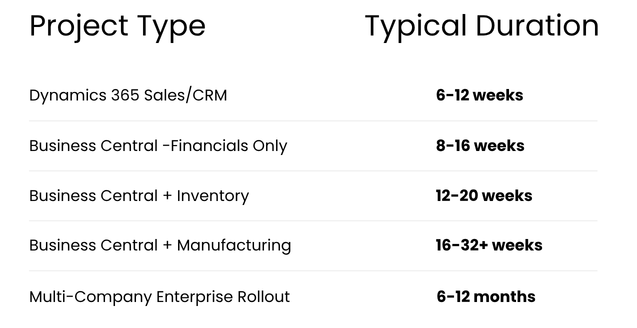
Actual Dynamics 365 implementation timelines vary based on project scope, integrations, data quality, customization requirements, organizational readiness, resource availability, and decision-making speed.
These ranges should be treated as planning guidelines rather than guaranteed implementation schedules.
What Can Affect a Dynamics 365 Implementation Timeline?
Two organizations implementing the same Microsoft Dynamics 365 product can have very different project timelines.
Some of the most common factors affecting implementation duration include:
Data Quality
Poor-quality or incomplete data can significantly delay migration and testing. Organizations that begin cleaning customer, vendor, product, financial, and other master data early can reduce implementation risk.
Integrations
Connections to e-commerce platforms, payroll systems, banks, third-party logistics providers, manufacturing systems, industry applications, and other software can add complexity and testing requirements.
Customizations
Extensive customization generally increases development, testing, documentation, and support requirements. Using standard Dynamics 365 functionality whenever practical can help reduce both implementation time and long-term system complexity.
Internal Resource Availability
A Dynamics 365 implementation requires active participation from business leaders and subject matter experts. Projects can slow down when key stakeholders are unavailable to answer questions, validate processes, test functionality, or make decisions.
Decision-Making Speed
Timely decisions are critical. Delays in approving requirements, designs, workflows, reports, or scope changes can extend the overall project schedule.
Training and Change Management
Employees need to understand both the technology and the new business processes surrounding it. Organizations that prioritize communication, training, and adoption throughout the project are typically better positioned for a successful go-live.
Organizations that prioritize communication, training, and adoption throughout the project are typically better positioned for a successful go-live.
Keys to a Successful Dynamics 365 ERP or CRM Deployment
Organizations that achieve the greatest success with Dynamics 365 typically:
- Assign a dedicated executive project sponsor
- Provide engaged subject matter experts
- Establish clear project ownership
- Make timely business decisions
- Clean and prepare data early
- Define reporting requirements early
- Minimize unnecessary customization
- Test realistic end-to-end business scenarios
- Invest in user training
- Develop a change-management strategy
- Establish clear go-live success criteria
- Plan for post-go-live optimization
A Dynamics 365 implementation is not simply a technology project.
It brings together technology, business processes, data, and people. When these elements are aligned, organizations are better positioned to achieve faster adoption and quicker time-to-value.
Why Choose OmniVue for Dynamics 365 Implementation?
For more than twenty years, OmniVue has helped organizations modernize operations using Microsoft Dynamics 365 Business Central, Dynamics 365 CRM, Microsoft Power Platform, and Business Intelligence solutions.
OmniVue’s implementation methodology emphasizes structured project governance, requirements-driven design, user training, deployment, and post-go-live support to help organizations reduce surprises and build solutions designed for long-term success.
Whether your organization is evaluating its first ERP system, replacing a legacy platform, implementing a modern CRM, or seeking greater visibility across sales, finance, inventory, manufacturing, and operations, following a structured Dynamics 365 implementation process can improve project outcomes.
The right implementation partner should do more than configure software. They should help your organization understand its requirements, evaluate options, improve processes, prepare users, manage risk, and build a roadmap that supports future growth.
Ready to Plan Your Dynamics 365 Implementation?
Understanding the Dynamics 365 implementation timeline is an important first step, but every organization’s requirements are different.
OmniVue can help evaluate your current systems and processes, identify the appropriate Microsoft Dynamics 365 solution, and develop an implementation roadmap based on your business requirements, priorities, and goals.
Ready to start your digital transformation journey? Contact OmniVue to schedule a discovery session and explore how Microsoft Dynamics 365 Business Central or Dynamics 365 CRM can help your organization scale with confidence.